The Chromium projects include Chromium and ChromiumOS, the open source projects behind the Google Chrome browser and Google ChromeOS, respectively. This site hosts documentation and code related to Chromium projects and is intended for developers interested in learning about and contributing to open source projects.
Chromium is an open-source browser project that aims to create a more secure, faster, and stable way for all Internet users to experience the web. This site contains design documents, architectural overviews, testing information, and more to help you learn how to build and work with the Chromium source code.
Chromium is an open source web browser development framework, maintained by several companies that then use the source code to create their own version of the browser with additional features.
The browsers share most of the same code and features, although there are some minor feature differences, and they are licensed under different licenses. The Chromium Project was originally initiated by Google, taking its name from the chromium element. Google's intention, as expressed in the developer documentation, was for chromium to be the name of the open source project and for the final product to be Chrome; however, other developers have taken Chromium code and released versions under the Chromium name. These are listed under community packages.
One of the project's main goals is for Chromium to be a tabbed window manager, or shell for the web, rather than a traditional browser application. The application is designed to have a minimalist user interface. The developers claim that it "should be lightweight and fast."
Install Chromium from the official repositories
Use the apt install command to get Chromium on Debian 12 as follows:
$ sudo apt install chromium
Instructions for installing Chromium on Flatpak
$ flatpak install org.chromium.Chromium
Install Chromium via binary
Download the binary: https://download-chromium.appspot.com/
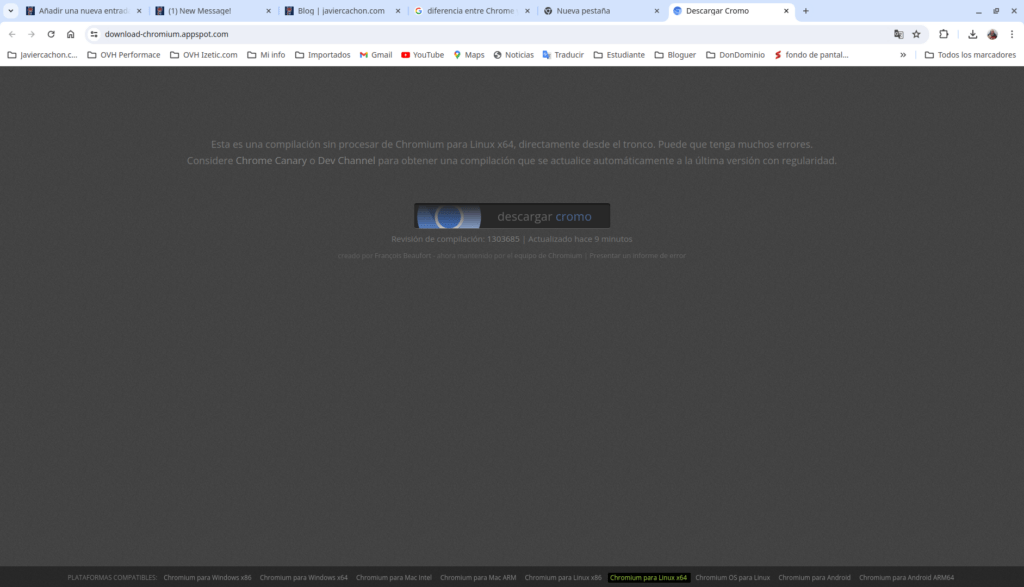
$ wget https://download-chromium.appspot.com/dl/Linux_x64?type=snapshots
$ sudo unzip chrome-linux.zip -d /opt
$ cd /opt/chrome-linux/
$ ls -l
$ ./chrome
To create the executable icon of the application in /usr/share/applications for the Desktop:
$ sudo vim /usr/share/applications/chromium.desktop
[Desktop Entry]
Name=Chromium
GenericName=Navegador Chromium
Comment=Chromium es un proyecto de navegador de código abierto de Google.
Exec=/opt/chrome-linux/chrome
Terminal=false
Icon=/opt/chrome-linux/product_logo_48.png
Type=Application
Categories=Navegador;Internet;Network;WebBrowser;
Version=1.0
Summary
Chrome is Google's official browser, and unlike Chromium, it's closed-source. While Chrome exchanges a lot of information with Google, Chromium doesn't send user data to the company. No crash reports, no telemetry, nothing.

Descubre más desde javiercachon.com
Subscribe to get the latest posts sent to your email.