1️⃣ Introduction
For decades, software engineering has followed a relatively stable pattern: the developer designs, implements, and validates, while the tools act as passive assistants. From classic UNIX editors to modern extension-based IDEs, the goal has always been Optimize productivity while maintaining human control of the process.
However, in recent years the paradigm has changed profoundly with the arrival of artificial intelligence systems applied to programming. First came intelligent autocomplete tools; later, assistants capable of generating complete functions. Today we are entering a new phase: environments agent-first, where AI no longer just suggests, but executes complex tasks under supervision.
Within this new paradigm arises Google Antigravity, a development environment presented in Public preview and geared towards a model based on autonomous agents. Its proposal is clear: to transform the classic IDE into a command center where multiple agents can plan, execute, and validate tasks on the code, the terminal, and the browser from a single workspace.
For users of Debian 13, This scenario is particularly interesting because it combines two seemingly opposing philosophies:
- Debian → stability, control and predictability.
- IDE agentic → advanced automation and autonomous execution.
The professional challenge lies in integrating both visions without losing fundamental engineering principles:
- Traceability.
- Reproducibility.
- Change control.
- Operational safety.
This guide is written from a technical and pragmatic perspective: it is not about "letting AI program", but about incorporating the tool within a well-defined professional workflow.
2️⃣ What is Google Antigravity?
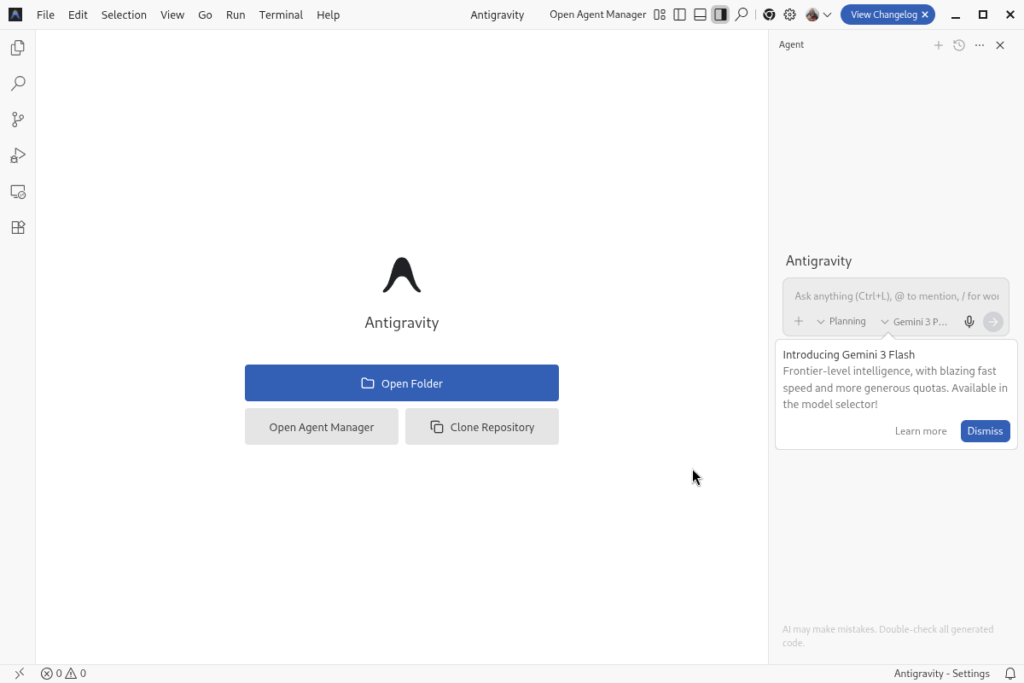
Google Antigravity It's an IDE geared towards AI-assisted development. Visually, it resembles a modern editor like VS Code, but adds a top layer called Agent Manager, from where intelligent agents capable of executing complete development tasks are coordinated.
Key concept: Agent-First IDE
Traditional model:
Human → writes code → tool assists
Antigravity Model:
Human → defines objective → agents plan and execute
Agents can:
- Modify files.
- Execute commands.
- Launch tests.
- Open built-in browser.
- Generate documentation and work artifacts.
Everything is recorded in “Artifacts” (plans, task lists and reports), which brings some transparency to the process.
3️⃣ Main features
🔹 Agent-based architecture
The IDE allows multiple agents to run simultaneously within the project:
- Planning agent.
- Coding agent.
- Testing agent.
- Documentation Agent.
This allows for parallel workflows similar to a virtual development team.
🔹 Agent Manager
Central panel where the following is monitored:
- Task status.
- Actions taken.
- Results and validations.
The user acts as both architect and technical supervisor.
🔹 Multi-surface operation
Antigravity can act on:
- Code editor.
- Integrated terminal.
- Embedded browser.
This reduces context switching and speeds up iterations.
🔹 Compatibility
Based on VS Code-type technology:
- Compatible existing extensions.
- Importing keybindings.
- Support for multiple languages.
4️⃣ Installing Google Antigravity on Debian 13
4.1 System Preparation
Common dependencies:
$ sudo apt install -y \
wget curl git ca-certificates \
libgtk-3-0t64 libnss3 libasound2t64
deb-based Linux distributions (eg. Debian, Ubuntu)
1. Add the repository to sources.list.d
$ sudo mkdir -p /etc/apt/keyrings
$ curl -fsSL https://us-central1-apt.pkg.dev/doc/repo-signing-key.gpg | \
  sudo gpg --dearmor --yes -o /etc/apt/keyrings/antigravity-repo-key.gpg
$ echo "deb [signed-by=/etc/apt/keyrings/antigravity-repo-key.gpg] https://us-central1-apt.pkg.dev/projects/antigravity-auto-updater-dev/ antigravity-debian main" | \
  sudo tee /etc/apt/sources.list.d/antigravity.list > /dev/null
2. Update the package cache
$ sudo apt update
3. Install the package
$ sudo apt install antigravity
Testing:
$ antigravity --version
1.107.0
1504c8cc4b34dbfbb4a97ebe954b3da2b5634516
x64
4.4 First start
When running:
$ antigravity
Typically, the assistant requests:
- Login.
- AI model selection.
- Importing a previous environment.
5️⃣ Recommended optional packages (professional environment)
Antigravity works best when the system has complete toolchains.
C/C++ Toolchain
$ sudo apt install build-essential cmake clang
Python stack
$ sudo apt install python3-full python3-pip
Web development
$ sudo apt install nodejs npm
Java
$ sudo apt install openjdk-21-jdk
Containers
$ sudo apt install docker.io
Technical reason
Agents can:
- Install dependencies.
- Compile,
- Run automated tests.
The more complete the environment, the greater the autonomy.
6️⃣ Professional IDE configuration
🔹 Import existing configuration
Antigravity allows importing from VS Code:
- extensions,
- snippets,
- topics,
- shortcuts.
🔹 Key security settings
Due to the ability to execute commands, it is essential to limit risks.
Disable auto-run
"agent.autoExecute": false
Require manual approval
"agent.requireApproval": true
This introduces mandatory human control.
🔹 Debian terminal profile
"terminal.integrated.defaultProfile.linux": "bash"
(or zsh depending on preference).
🔹 Classic DevOps Recommendations
- Git repository required,
- frequent commits,
- local backups,
- Never run as root.
7️⃣ Safety and operational risks
Agent-based SDIs have real risks:
- accidental execution of commands,
- display of credentials,
- Access to sensitive files.
External research has indicated that automated execution can cause problems if there is no supervision.
Recommended good practices:
✔ Use a user without privileges
✔ Deactivate aggressive automations
✔ Always review the agent's plans
✔ Working in isolated Git branches
8️⃣ Recommended professional workflow (classic view)
A balanced approach:
- Human-defined architecture.
- Agent performs repetitive tasks.
- Mandatory manual review.
- Refactoring and human documentation.
- Automatic testing.
AI accelerates; the engineer validates.
9️⃣ Conclusion
Google Antigravity represents a major paradigm shift:
- From the SDI assisted to the SDI orchestrated by agents.
- From autocomplete to partial automation of development.
In Debian 13, it can be successfully integrated provided that:
- A philosophy of technical control is maintained.
- Clear restrictions are set.
- Human supervision is prioritized.
The professional key is not to delegate everything to AI, but to turn it into a productivity multiplier within a solid, predictable, and secure workflow.
📚 References
- Documentation and description of the IDE.
- Overview of the agent-first approach.
- Technical operating information.
- Security considerations in standalone IDEs.

Descubre más desde javiercachon.com
Subscribe to get the latest posts sent to your email.